Custom activity cards after purchase
Something missing from your family routine? After purchase you can make more cards with a name and image — as a printable cutout sheet.
How it works
No account needed. After purchase you get a link by email and on the download page.
- 1
Buy and download your weekly plan
After payment you'll find «Create custom activity cards» next to the PDF downloads — and again in the confirmation email.
- 2
Open the tool
The link unlocks it right away. Or enter the order ID from the checkout URL.
- 3
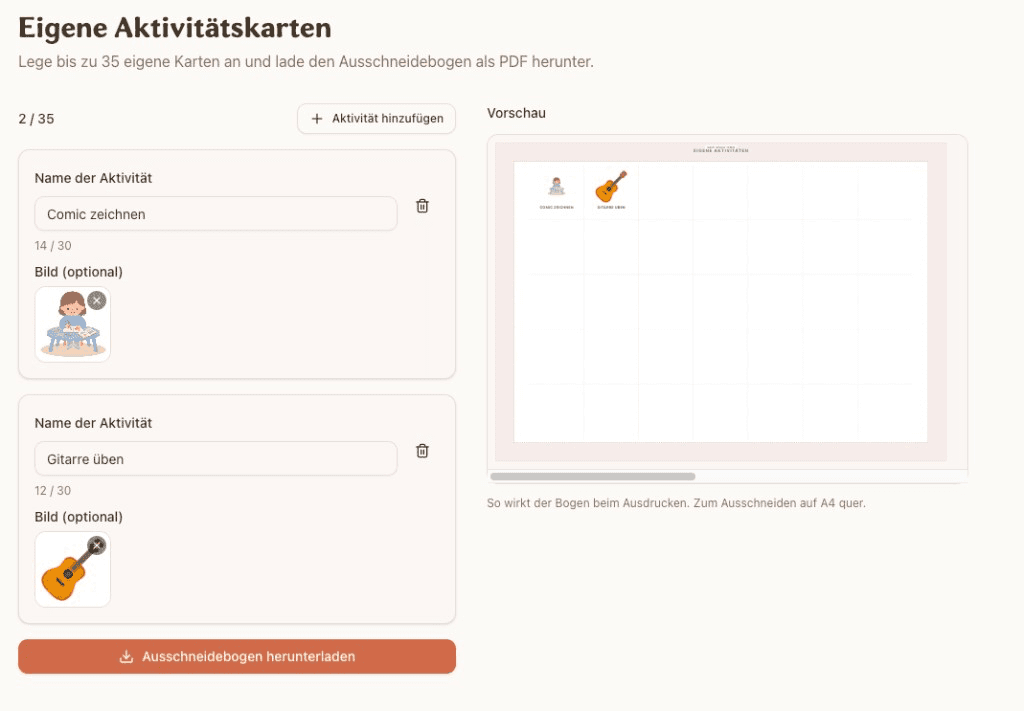
Add name and image
Give each card a short name (e.g. «Practice guitar») and optionally a photo or icon. Up to one full cutout page.
- 4
Check the preview
On the right you see how the sheet will look: grid, labels, images — just like when you print.
- 5
Download the PDF and cut
Save the cutout sheet, print landscape A4, cut out, stick on the weekly plan. Done.
Already possible in the wizard
While building your plan you can add up to five custom activities with an image. Missing something in the set? Write to us, or use the tool after purchase for more cards.
Start your weekly plan
Put the plan together, check the preview, then add more cards after purchase if you need them.